
Table of Contents
Rapid application delivery used to be a product-team luxury. In 2025 it’s a competitive requirement. Low-code and no-code platforms are now mature enough that dev teams — not just citizen developers — are adopting them to ship business apps faster, reduce backlog, and focus engineering effort on core differentiation.
This guide explains why dev teams should seriously consider low-code/no-code, how to evaluate platforms, which vendors make the most sense in 2025, and exactly how to adopt them safely at scale.
Need Fast Hosting? I Use Hostinger Business
This site runs on the Business Hosting Plan. It handles high traffic, includes NVMe storage, and makes my pages load instantly.
Get Up to 75% Off Hostinger →⚡ 30-Day Money-Back Guarantee
Why low-code/no-code matters to developer teams in 2025
In 2025 the pressure is the same as ever: build faster, reduce cost, and keep quality high. But toolset expectations have matured:
- Businesses need internal apps (dashboards, workflows, portals) fast. Building everything from scratch delays value.
- Dev teams are scarce; product teams demand autonomy.
- Modern low-code/no-code platforms are extensible (JS/TypeScript hooks, REST/GraphQL integrations, serverless functions), not just drag-and-drop visual builders.
- Observability, CI/CD integrations, and enterprise security have improved — making these platforms actually usable for professional engineering teams.
Put simply: low-code/no-code can be a force-multiplier when you choose the right platform and implement governance.
What low-code and no-code really are
- No-code: Tools aimed at non-developers that let users build apps via visual editors and prebuilt blocks (e.g., sites, forms, simple automations). Little-to-no code required.
- Low-code: Visual development plus the ability to inject code (JS, Python, serverless functions). Designed for both citizen devs and professional engineers — great for building production-grade apps faster.
In 2025 these categories overlap: most serious platforms now offer visual building + code hooks.
Benefits for dev teams — the ROI you should expect
- Faster time-to-value: Ship internal apps in days/weeks vs months.
- Lower maintenance overhead: The platform handles hosting, scaling, and many ops tasks.
- Better alignment with product: Non-engineer PMs can iterate UI and flows while devs focus on APIs and scalability.
- Reusability: Shared components and templates reduce duplication.
- Extensibility: Modern platforms provide SDKs, webhooks, and serverless hooks so engineers keep full control of business logic.
If you want more details with enhanced visuals, then see the pdf below (login Required)
Download for Free!Risks & tradeoffs
- Vendor lock-in — exporting complex apps can be hard; export & portability should be tested early.
- Security & compliance — not every platform meets strict regulatory needs out-of-the-box.
- Hidden costs — per-user, per-action, or connector pricing can balloon at scale.
- Custom logic limits — some platforms struggle with advanced workflows or high-throughput needs.
- Testing & CI — visual apps require a different test approach; confirm test & staging support.
How dev teams should evaluate low-code/no-code platforms (the checklist)
Before a pilot, run a short evaluation using these axes:
- Extensibility: Can engineers write code, call internal services, and add custom UI components?
- Integration: Native connectors for your stack (Databases, Kafka, REST/GraphQL, SSO, observability).
- Enterprise security: SSO (SAML/OIDC), RBAC, audit logs, data residency options.
- Performance & scaling: How the runtime behaves under concurrency and data volume.
- Export & portability: Can you export app definitions, code, or data?
- Testing & CI/CD: Support for automated tests, staging, and repeatable deployment.
- Cost predictability: Pricing model clarity for scale.
- Community & vendor support: Documentation, SDKs, and timely support.
Top platforms to evaluate in 2025 — a practical comparison
Below is an HTML-styled comparison table you can paste into your blog/cms. It focuses on developer-relevant criteria and shows where each tool is strongest.
| Platform | Best For | Developer Extensibility | Enterprise Security | Pricing Model |
|---|---|---|---|---|
| Retool | Internal tools & dashboards | High — JS components, SQL/JS transformers, plugins | SSO, RBAC, private hosting options | Seat-based + enterprise plans |
| OutSystems | Enterprise multi-app portfolios | High — full-stack code extensibility | Strong — SOC2, SSO, governance | Enterprise licensing |
| Mendix | Large enterprise workflows | High — microflows + custom code | Strong — compliance & governance | Subscription / enterprise |
| Microsoft Power Apps | Office/365 ecosystems & citizen devs | Moderate — Power Fx + custom connectors | Enterprise-ready with Azure AD | Per-app or per-user licensing |
| Bubble | Customer-facing websites & MVPs | Moderate — JS plugins & APIs | Basic — needs review for regulated data | Tiered plans (startup-friendly) |
| Webflow + Jetboost/Softr | Marketing sites & content-driven apps | Low–Moderate — custom code embeds | Basic — suitable for public sites | Site-based pricing |
| Airtable + Softr/Glide | Quick internal apps & prototyping | Moderate — scripts and extensions | Moderate — check data policies for sensitive info | Tiered pricing |
| Appian | Complex workflows & BPM | High — Java/JS integrations | Strong — enterprise governance | Enterprise licensing |
Short platform deep-dives — when to use which platform
Retool — internal tools, fast
- Use if: You need read-write dashboards, admin panels, or data ops tools that call internal APIs.
- Why devs like it: Retool is engineered for engineers — you can write JS, run SQL, build custom components, and push to production quickly.
- Look out for: Seat-based costs and UX configuration at scale.

OutSystems & Mendix — enterprise multi-app platforms
- Use if: You’re running large portfolios that need governance, lifecycle management, and strict compliance.
- Why devs like it: Enterprise features (lifecycle, role-based governance, versioning) plus code hooks for complex logic.
- Look out for: Enterprise licensing and learning curve.
Microsoft Power Apps — best for Office/365 ecosystems
- Use if: Your org is heavily invested in Microsoft 365 and Azure.
- Why devs like it: Deep integration with Azure AD, Teams, and SharePoint; great for citizen dev productivity.
- Look out for: Complex logic can become harder to maintain compared to code-first approaches.

Bubble — customer-facing MVPs and marketplaces
- Use if: You need to prototype or launch a customer-facing product fast without an engineering backlog.
- Why PMs love it: Frictionless visual creation, hosting included, plugins for payments/auth.
- Look out for: Performance considerations for heavy traffic; exporting server-side logic can be difficult.
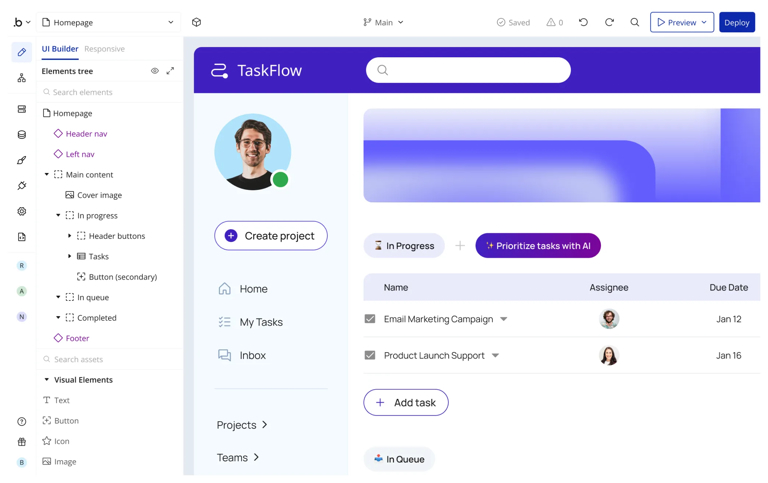
Airtable + Softr/Glide — prototypes, ops automation
- Use if: You need a spreadsheet-as-database to power simple apps and dashboards.
- Why devs like it: Rapid prototyping and excellent for CRUD-style admin UIs. Use Airtable scripts or custom blocks for heavier logic.
- Look out for: Data size limits and concurrency issues at scale.

Appian — workflows & BPM at scale
- Use if: You run regulated processes (finance, healthcare) with complex BPM requirements.
- Why devs/architects like it: Native BPM features, audit trails, and enterprise-grade governance.
- Look out for: Cost and vendor lock-in for complex automations.
Governance, security & SRE: how to adopt at scale (practical guide)
Adopting low-code/no-code across an engineering org requires discipline. Here’s an operational checklist:
- Platform governance policy
- Approve a small set of enterprise platforms.
- Define which app types are allowed (internal vs customer-facing).
- Security baseline
- Require SSO (OIDC/SAML), enforce RBAC.
- Ensure platforms support encryption at rest and in transit, data residency.
- Scan third-party connectors for data exfiltration risk.
- CI/CD & testing
- Use platforms with staging environments and exportable definitions so you can include them in test pipelines.
- Implement automated UI smoke tests and API contract tests.
- Observability & alerts
- Centralize logs (platform logs -> SIEM).
- Add service-level metrics; define SLOs for critical internal apps.
- Performance & scalability checks
- Load-test critical apps during pilot.
- Monitor latency and concurrency; ensure platform can autoscale.
- Data governance
- Classify data used in apps (PII, PHI, public).
- Disallow regulated data on unsupported platforms.
- Exit & portability plan
- Maintain a documented export mechanism for data and business logic.
- Regularly validate that exports can be restored in a sandbox.
Implementation roadmap — a pragmatic 6-week pilot
Week 0: Stakeholder alignment & success metrics (time-to-delivery, cost, security guardrails)
Week 1: Platform shortlisting (3 candidates) + sandbox access for devs & PMs
Week 2: Build a canonical internal app (inventory CRUD + auth + 1 external integration)
Week 3: Add CI/test integration + run security checklist
Week 4: Load & performance testing; revise design
Week 5: Soft launch to a business unit + gather feedback
Week 6: Decision: expand, iterate, or sunset
This rapid pilot approach gives measurable results and avoids “pilot purgatory.”
Developer perspectives — what engineers actually say
- “Retool saves us weeks of dashboard work. We still build core services, but admin UIs are no-brainers.” — senior backend engineer.
- “Power Apps let product people ship workflows, but for complex rules we still push logic into microservices.” — platform architect.
- “Bubble’s shipping speed helped our founder launch an MVP — but we had to rewrite after product-market fit.” — startup CTO.
- “Airtable + scripts are life-savers for ops, but once we hit 20k records we migrated the table to Postgres.” — growth engineer.
These recurring patterns highlight a shared mental model: use low-code/no-code for speed, but plan for scale and extraction of logic when necessary.
Case studies
Case study A — Fintech internal ops automation
A mid-size fintech used Retool + internal APIs to replace manual reconciliation spreadsheets. Results after 8 weeks:
- Replaced 4 manual processes with a single Retool app.
- Reduced reconciliation time from days to hours.
- Engineers added audit logging and RBAC via Retool’s SSO integration.
Takeaway: Internal tools are the lowest-risk, highest ROI entry point.
Case study B — Marketplace MVP on Bubble
A two-founder marketplace launched using Bubble. They achieved initial traction and validated core marketplace mechanics in 6 weeks. At scale, they migrated critical routing and payments logic to microservices while keeping Bubble for the marketing site.
Takeaway: Bubble accelerates market validation but plan to extract heavy-lift logic as you scale.
Case study C — HR workflows with Power Apps
A global enterprise rolled out Power Apps + Azure AD for HR intake forms and approvals, integrated with SAP/Workday. Compliance controls and centralized governance made Power Apps the right fit.
Takeaway: Choose platform based on ecosystem alignment (e.g., Microsoft shops -> Power Apps).
Testing & QA for visual apps — the right approach
- Unit-level: Abstracted services should be unit-tested outside the platform.
- Integration: Mock external APIs and validate API contracts.
- End-to-end: Use UI automation (Cypress, Playwright) against staging instances.
- Regression: Snapshot flows that matter (onboarding, payments).
- Accessibility & performance: Run Lighthouse checks and automated accessibility tests.
If a platform has a programmable test API or exportable definitions, integrate those into CI.
Cost management & licensing considerations
- Model expected growth (users, actions, automations) and validate vendor pricing at projected scale.
- Negotiate enterprise plans for predictable costs — many vendors offer resource-based licensing for heavy usage.
- Account for hidden costs: paid connectors, extra storage, or faster support SLAs.
When to avoid low-code/no-code
- Processing regulated PHI/PII on platforms without appropriate compliance.
- Ultra-low latency, high-throughput backends where platform runtime is a bottleneck.
- Core product features that require full engineering control and portability.
Migration & exit playbook
- Keep business logic in services, not in visual workflows where possible.
- Export data schemas and automate backups.
- Document app behavior and connectors.
- Maintain an “escape hatch” microservice that can mimic key workflows if migration is required.
FAQs
1. Are low-code/no-code platforms secure enough for enterprise use?
Yes — many platforms offer enterprise-grade security (SSO, RBAC, SOC2). Security depends on configuration, governance, and not storing regulated data where the platform lacks compliance attestations.
2. Will low-code/no-code replace developers?
No. They change where developers spend time: fewer UI CRUD pages, more on APIs, integrations, testing, and scalability. Devs become orchestrators and platform integrators.
3. How do we test visual apps in CI?
Use the platform’s export or API hooks (if provided), run integration tests against staging, and use E2E tools (Playwright/Cypress) for UI flows.
4. What’s the best first app to build on a low-code platform?
Internal admin dashboards, approvals/workflows, and small data-entry apps — these have high impact and low risk.
5. How do we estimate cost at scale?
Map expected daily active users, API calls, and automation runs. Request enterprise pricing simulations from vendors and include connector/extra-storage fees in TCO.
Final thoughts — a pragmatic developer’s recommendation
Low-code and no-code are not a fad. In 2025 they’re real tools in the toolbox — powerful, pragmatic, and mature enough that developer teams should evaluate them as part of delivery strategy.
Start small: pilot an internal app, prove ROI, build governance, and centralize patterns (templates & shared components). Keep business logic in code-backed services when possible. When you combine the speed of visual platforms with engineering discipline, you’ll ship more, faster — without sacrificing long-term stability.


0 Comments
Leave a Comment
Your email address will not be published. Required fields are marked *